

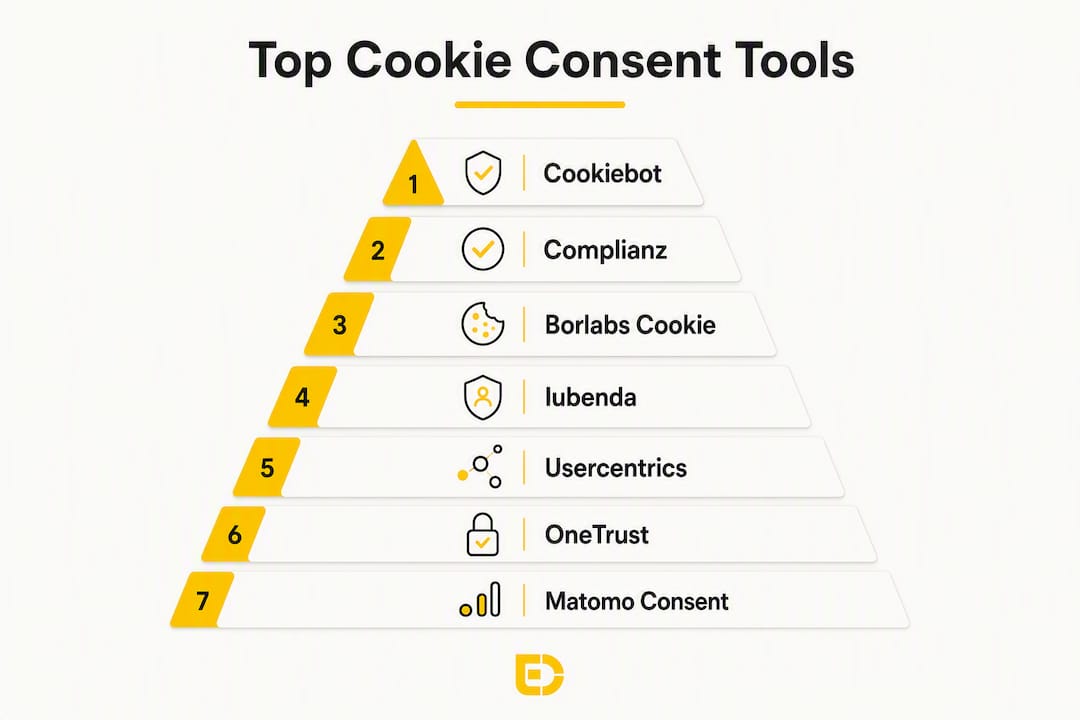
For GDPR-compliant WordPress sites in Central Europe, the tools worth your time are: Cookiebot and Complianz for small businesses, Borlabs Cookie for developer-led WordPress projects, Iubenda if you also need legal document generation, Usercentrics or OneTrust at enterprise scale, and Matomo Consent Manager for self-hosted analytics stacks. Every one of them offers prior script blocking, consent logging, and EU data-handling options — the three features that separate a genuine consent management platform (CMP) from a decorative banner.
GDPR and the ePrivacy Directive require that non-essential cookies cannot fire until a user gives a clear, affirmative act of consent. Pre-ticked boxes are prohibited, and rejecting must be as easy as accepting. A banner that merely announces cookies while trackers load in the background fails this test entirely.
| Tool | Best for | Why it makes the shortlist |
|---|---|---|
| Cookiebot (Cybot) | Small to mid-sized organisations | Automatic scanning, simple WordPress setup, EU cloud hosting |
| Complianz | Small WordPress businesses | Region-aware templates, integrated policy generation, easy UI |
| Borlabs Cookie | Developer-led WordPress projects | Self-hosted, granular script control, strong localisation |
| Iubenda | Combined policy + CMP needs | Legal document tooling alongside consent management |
| Usercentrics | Large organisations | Enterprise consent logging, extensive integrations |
| OneTrust | Enterprise privacy programmes | Broad privacy platform beyond CMP |
| Matomo Consent Manager | Self-hosted analytics stacks | Open-source, privacy-first, no third-party cloud dependency |
Which cookie consent tools actually work for WordPress?
The table below covers the dimensions that matter for a Central European small business: script blocking, consent logs, WordPress fit, and EU hosting.
| Tool | WP integration | Auto scan | Prior script blocking | Consent logs / export | EU hosting / DPA | Multilingual | WCAG support | Pricing model |
|---|---|---|---|---|---|---|---|---|
| Cookiebot | Plugin + script | ✓ | ✓ | ✓ | EU cloud (Cybot A/S) | ✓ | Partial | Free (1 domain) / subscription |
| Complianz | Plugin | ✓ | ✓ | ✓ | Self-hosted / EU | ✓ | ✓ | Free / premium |
| Borlabs Cookie | Plugin | Manual / paid add-on | ✓ | ✓ | Self-hosted | ✓ | ✓ | One-time licence |
| Iubenda | Script / plugin | ✓ | ✓ | ✓ | EU cloud | ✓ | Partial | Subscription |
| Usercentrics | Script / API | ✓ | ✓ | ✓ | EU cloud (Germany) | ✓ | ✓ | Subscription / enterprise |
| OneTrust | Script / API | ✓ | ✓ | ✓ | EU cloud | ✓ | ✓ | Enterprise |
| Matomo CMP | Plugin (Matomo) | Manual | ✓ | ✓ | Self-hosted | ✓ | Partial | Free (open-source) |
Cookiebot scans your site automatically and generates a cookie declaration, which saves hours of manual cataloguing. Its free tier covers one domain, making it a realistic starting point before committing to a subscription.
Complianz is the most approachable option for non-technical WordPress owners. It walks you through a setup wizard, generates region-aware policy templates, and handles WooCommerce compatibility out of the box.
Borlabs Cookie gives developers the most control: scripts are registered directly in the plugin, blocking is handled at the WordPress level rather than via a cloud service, and the one-time licence model avoids recurring fees. Cookie scanning requires a paid add-on.
Iubenda bundles a cookie banner with privacy policy and terms-of-service generation. If you need all three legal documents in one place, that combination saves time and reduces the risk of misalignment between your policy and your actual consent setup.
Usercentrics is built for organisations that need granular per-vendor consent controls, detailed audit logs, and integrations with data management platforms. The price reflects that scope.
OneTrust goes well beyond a CMP: it covers data subject requests, vendor risk assessments, and privacy impact assessments. For a small WordPress site, it is almost certainly more than you need.
Matomo Consent Manager only makes sense if you are already running Matomo for analytics. It keeps your entire data stack self-hosted, which is a genuine advantage for organisations with strict data residency requirements.
Consent logs with timestamps and exportable audit trails are necessary to demonstrate accountability under GDPR. Every tool above stores what was shown, when, and what the user accepted. Confirm the export format before you commit.
Many free WordPress plugins only display a cosmetic banner without blocking scripts or supporting Google Consent Mode v2. For any site running Google Ads or conversion tracking, GCM v2 support is not optional.
How do you choose the right consent management platform?
For a small WordPress business, the single most important criterion is prior script blocking: does the tool actually prevent trackers from firing before consent, or does it just show a notice? Everything else is secondary.
Selection checklist:
- Prior script blocking confirmed (not just a banner display)
- Granular per-purpose toggles — analytics, marketing, and preferences must be independently switchable; bundled consent is non-compliant
- Exportable consent logs with timestamps
- Google Consent Mode v2 support (critical for Google Ads users)
- EU data processing agreement available
- Multilingual support covering your target markets
- Caching plugin compatibility (WP Rocket, W3 Total Cache, LiteSpeed)
- WCAG-accessible UI with equal prominence for accept and reject
Questions to ask vendors before signing:
- Where are consent logs stored, and for how long?
- How is prior blocking implemented — server-side, tag-level, or JavaScript wrapper?
- Do you support WooCommerce and common caching plugins?
- Is a Data Processing Agreement included in the base plan?
- How does the tool handle consent version changes when you update your cookie policy?
Red flags to walk away from:
- No reject option on the first layer of the banner
- “Accept all” button visually dominant over “Reject” or “Manage preferences”
- Trackers visible in the Network tab before any interaction
- No exportable audit log
- Consent logs stored outside the EU with no DPA
Pro Tip: During a free trial, open a private browser window with cleared storage and watch the Network tab before touching the banner. If you see requests to Google Analytics, Facebook, or any advertising domain, prior blocking is not working — regardless of what the vendor’s marketing says.
How do you implement a CMP correctly on WordPress?
Prior script blocking and correct snippet placement are the two most common technical failures. A banner that loads after your analytics tag is already a compliance problem.
- Install the CMP plugin or add the snippet in
before any other scripts. If the CMP initialises after Google Tag Manager, trackers can fire on page load. - Register all third-party scripts through the CMP, not directly in your theme or via a separate plugin. Borlabs Cookie and Complianz both provide a script manager for this.
- Configure Google Tag Manager with consent checks. Set GTM tags to fire only when the relevant consent signal is granted. Egg Design’s Google Consent Mode v2 guide covers the exact tag configuration.
- Test caching compatibility. WP Rocket and LiteSpeed Cache can serve a cached page that bypasses the CMP. Exclude the consent cookie from caching rules and confirm the banner appears on every fresh session.
- Verify WooCommerce checkout scripts. Payment gateway scripts often load independently; confirm they are either strictly necessary or gated behind consent.
- Run the compliance test: clear all cookies and storage, load the homepage, open DevTools Network tab, and confirm no analytics or advertising domains are contacted before you interact with the banner.
- Test the withdrawal flow. The option to change or withdraw consent must be persistent and easy to find — typically a floating icon or footer link.
- Export a test consent log to confirm the format, timestamp accuracy, and that banner version is recorded.
Pro Tip: Place the CMP snippet using a WordPress wp_head hook with a priority of 1 (the lowest number, meaning it fires first). This beats most theme and plugin scripts to the page and prevents accidental early tag firing.
What does cookie consent compliance cost for a small business?
| Tier | Typical tools | Expected annual licence | What you get |
|---|---|---|---|
| Free / basic | Complianz (free), Matomo CMP | €0 | Banner, basic blocking, limited logs |
| Low-cost subscription | Cookiebot (small site), Complianz Premium | €10–€15/month | Auto scanning, full logs, GCM v2 |
| Mid-market subscription | Borlabs Cookie, Iubenda | €40–€100/year (one-time or annual) | Full script control, legal docs, localisation |
| Enterprise | Usercentrics, OneTrust | Custom pricing | Advanced audit trails, DMP integrations, SLA |
Implementation cost on top of the licence depends on how much is done in-house:
- DIY with a developer (4–8 hours): script registration, GTM configuration, caching rules, and testing. At typical Central European freelance rates, budget €300–€600 for a standard WordPress site.
- WooCommerce store: add 2–4 hours for payment gateway script auditing and checkout flow testing.
- Agency implementation with ongoing support: a fixed-price package covering setup, branding, and quarterly scans typically runs €500–€1,200 for initial implementation, with monthly maintenance from €50 upwards.
Hidden costs to budget for:
- Multilingual configuration (each additional language adds setup time)
- Cookie scanning credits on platforms that charge per scan
- Audit log retention beyond the default period (some platforms charge for extended storage)
- Policy updates when you add new plugins or third-party services
Compliance is ongoing, not a one-off install
Installing a CMP is the start, not the finish. Automatic cookie scanning is recommended precisely because plugin and theme updates routinely introduce new trackers without warning.
Ongoing maintenance checklist:
- Run a full cookie scan after every major plugin or theme update
- Refresh consent and update the cookie declaration when purposes or cookie lifespans change
- Confirm the withdrawal mechanism is still visible and functional after design changes
- Review consent log retention settings annually
- Check that accept and reject options remain equally prominent after any banner style update
Common pitfalls and how to fix them:
- Trackers firing pre-consent after a plugin update: re-audit the script manager and re-register any new scripts the plugin introduced.
- Buried withdrawal UI: add a persistent floating button or a clearly labelled footer link; do not rely on users finding it in a privacy policy page.
- Consent cookie misconfiguration: if the consent cookie itself expires too quickly, returning visitors are asked repeatedly, which erodes trust and inflates rejection rates.
- Banner style update breaks equal prominence: DPC guidance is explicit that emphasising “Accept” over other choices is poor practice and a regulatory red flag.
Pro Tip: Schedule a quarterly calendar reminder to clear your browser storage and run the Network tab test on your own site. It takes five minutes and catches the majority of post-update compliance drift before a regulator does.
Egg Design handles GDPR consent management for WordPress clients
The tools above are solid, but configuring them correctly — prior blocking, GTM integration, caching rules, WooCommerce compatibility, branded banner design, and exportable audit logs — takes time and technical precision most small business owners would rather not spend.
Egg Design builds bespoke, GDPR-compliant WordPress websites with consent management built in from the start, not bolted on afterwards. That means prior script blocking verified before launch, consent logs configured and tested, GCM v2 wired correctly into GTM, and a branded banner that meets WCAG accessibility standards. Ongoing maintenance packages cover quarterly cookie scans, policy updates, and compliance checks so your site stays audit-ready as your plugin stack evolves. Get in touch for a free technical review of your current consent setup.
Useful sources and further reading
- Online privacy: how to use cookies on your website — Your Europe (EU): the EU’s plain-language guide to which cookies require consent and what that means in practice.
- EDPB Guidelines 05/2020 on consent under GDPR: the authoritative European Data Protection Board guidance on valid consent, including cookie walls and scrolling.
- EDPB Guidelines 2/2023 on the technical scope of Article 5(3) of the ePrivacy Directive: covers fingerprinting and newer tracking methods beyond standard cookies.
- Data Protection Commission — guidance on cookies and tracking technologies: the Irish DPC’s enforcement-informed guidance; directly applicable to Central European compliance practice.
- DPC report on cookies and tracking technologies: covers withdrawal mechanisms, audit trails, and enforcement priorities.
- Egg Design — cookie consent GDPR compliance guide: practical implementation guidance and a checklist for WordPress site owners.
- Egg Design — privacy policy guide for small businesses: how to align your privacy policy with your CMP’s consent declarations.
When auditing a CMP during a trial, cross-reference the vendor’s claims against the DPC guidance and the EDPB consent guidelines. If a vendor cannot point to where prior blocking is documented in their technical architecture, treat that as a red flag.